
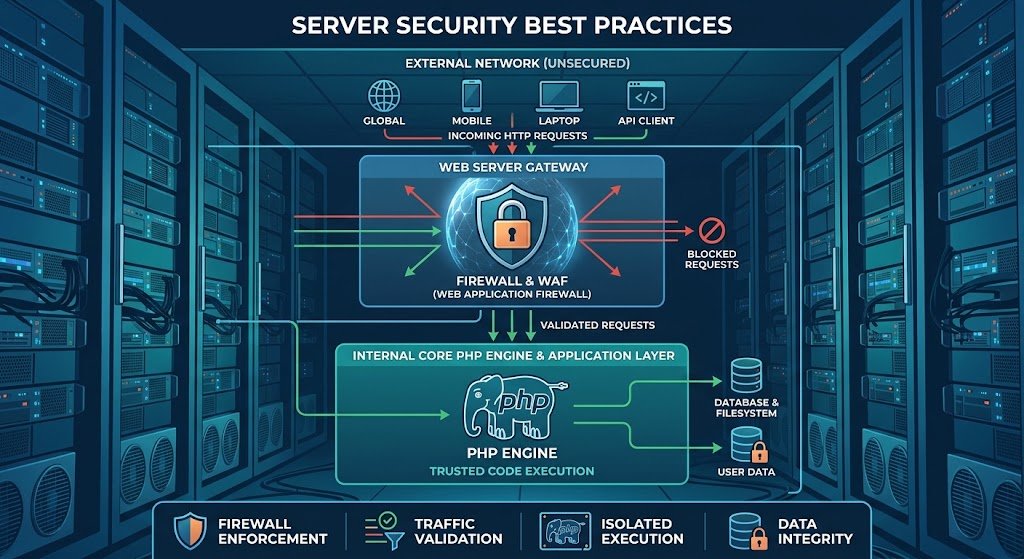
Securing Your Digital Infrastructure: Understanding and Mitigating Recent PHP Security Flaws & RCE Vulnerabilities
Complete Technical Guide & Master Security Blueprint
1. Introduction: The Escalating Threat Landscape of PHP RCE Vulnerabilities
Securing web infrastructure requires constant vigil against remote code execution risks. Implementing a recent PHP vulnerability fix is crucial for webmasters running WordPress or custom PHP applications. Recent exploits targeting CGI argument injection (such as CVE-2024-4577) allow unauthenticated attackers to execute malicious code on unpatched web servers. Applying a complete recent PHP vulnerability fix protects your web server from complete compromise.
PHP powers a staggering percentage of the web—fueling everything from small business blogs to enterprise-grade WordPress installations, custom web apps, and massive e-commerce platforms. Because of this ubiquity, it remains a primary target for malicious actors worldwide.
When a critical security flaw surfaces in the core PHP runtime or its CGI (Common Gateway Interface) handling mechanisms, the ripples are felt across millions of servers simultaneously. Recent high-profile vulnerabilities, such as the critical argument injection and Remote Code Execution (RCE) flaws (notably CVE-2024-4577), have demonstrated how quickly a minor parsing anomaly can escalate into a full-scale infrastructure takeover.
If you manage a WordPress site, a custom PHP application, or an entire cluster of Linux and Windows web servers, understanding these vulnerabilities is no longer optional—it is a core requirement for survival online. This guide breaks down the technical underpinnings of these recent security issues, explains how attackers exploit them, and provides actionable, bulletproof steps to secure your systems.
2. Understanding the Problem: Anatomy of Recent PHP Flaws
To fix a vulnerability, you first need to understand how it operates under the hood. Recent discoveries, particularly those involving PHP-CGI argument injection, highlight a dangerous disconnect between how web servers interpret input and how the underlying operating system executes commands.
Simple Terms vs. Technical Terms
- In Simple Terms: Imagine your web server as a secure warehouse. A specialized intake clerk (the CGI handler) is supposed to check incoming packages. Because of a quirk in how certain languages or character sets are read, a clever intruder can disguise a crowbar as a harmless label. The clerk misreads the label, lets the crowbar inside, and hands it straight to the bad guys, who use it to break into the main vault.
- In Technical Terms: The vulnerability arises from flaws in character encoding conversion handling—specifically the ‘Best-Fit’ multi-byte character mapping behavior on Windows systems and specific locale settings (such as Traditional Chinese, Simplified Chinese, or Japanese code pages). When PHP operates in CGI mode, incoming HTTP query strings are processed and decoded. Attackers can leverage specific byte sequences (like substituting a standard hyphen with a soft hyphen, e.g., %AD) to bypass historical security filters (such as patches designed over a decade ago for CVE-2012-1823).
Once this filter is bypassed, the web server passes arbitrary command-line arguments—such as -d (which defines a PHP configuration entry)—directly to the PHP binary. An attacker can use flags like allow_url_include and auto_prepend_file to execute remote scripts or arbitrary system commands, achieving unauthenticated Remote Code Execution (RCE).
| Pro Developer Tip: Never assume that legacy security patches are permanent. Attackers frequently revisit decade-old vulnerability classes (like CGI argument injection) to find subtle character encoding discrepancies or parser edge cases that modern operating systems handle differently than legacy builds. |
3. Who is Affected? The Intersection of PHP Versions and Server Environments
The scope of these vulnerabilities depends heavily on your server stack, operating system, and PHP execution mode.
Vulnerable PHP Versions
- PHP 8.3 Branch: Versions prior to 8.3.8
- PHP 8.2 Branch: Versions prior to 8.2.20
- PHP 8.1 Branch: Versions prior to 8.1.29
- Legacy Branches: Older, End-of-Life (EOL) branches like PHP 8.0, 7.4, and below are perpetually vulnerable unless backported or patched by enterprise vendors.
Server Operating Systems & Web Servers
- Operating Systems: While Windows environments utilizing specific localized code pages are ground zero for CGI argument injection exploits, misconfigured Linux and Unix environments running outdated CGI/FastCGI implementations remain susceptible to parallel vector attacks.
- Web Server Software: Apache HTTP Server, IIS, and Nginx configurations that mistakenly expose the php-cgi binary or rely on legacy Action and ScriptAlias directives.
Real-World Impact
- 1. Malicious Code Injection: Deployment of persistent web shells (.php backdoors) hidden deep within media uploads or plugin directories.
- 2. Server Takeover: Execution of PowerShell or Bash scripts to download coin miners, ransomware (such as TellYouThePass variants), or proxy tools.
- 3. Data Leakage: Full extraction of WordPress configuration files (wp-config.php), database credentials, and customer personally identifiable information (PII).
- 4. Site Defacement & SEO Spam: Mass injection of spam links, redirection scripts, and malicious JavaScript payloads into your database.
4. Step-by-Step Complete Solutions & Fixes
Mitigating these threats requires a defense-in-depth approach. Implement the following methods immediately to secure your environment.
Method 1: Upgrading PHP Versions Safely (The Gold Standard)
The most definitive fix for any core software vulnerability is applying the vendor’s official security patch.
- 1. Check your current version: Run ‘php -v’ via your command line or check your WordPress Site Health screen.
- 2. Backup everything: Take a full snapshot of your server, file system, and database before updating.
- 3. Update PHP packages: Execute package update steps for your specific Linux distribution:
| # For Ubuntu/Debian: sudo apt update sudo apt install php8.3 php8.3-cgi php8.3-fpm -y # For RedHat/AlmaLinux/Rocky Linux: sudo dnf upgrade php -y |
- 4. Verify the upgrade: Ensure your PHP runtime reflects versions 8.3.8, 8.2.20, 8.1.29, or higher.
| Pro Developer Tip: If you manage client sites running older code, test updates in a staging environment first. Pay close attention to deprecated functions or extension mismatches (like missing php-mysql or php-xml modules) that can trigger a ‘White Screen of Death’ after an upgrade. |
Method 2: Server-Level Configurations & Hardening
If you must run PHP via CGI (though PHP-FPM or mod_php are heavily preferred for security), you must implement strict web server rules.
Apache Configuration & .htaccess Rules
To block malicious query strings attempting to inject parameters like -d or make use of encoded soft hyphens (%AD), add the following rules to your root .htaccess file or main Apache configuration:
| <IfModule mod_rewrite.c> RewriteEngine On RewriteCond %{QUERY_STRING} (%|%25)(2d|ad)[d|s|e|n|i|f] [NC,OR] RewriteCond %{QUERY_STRING} \s*-\w+\s*= [NC] RewriteRule .* – [F,L] </IfModule> |
Nginx Configuration Block
If you use Nginx with upstream PHP handling, ensure your location blocks do not pass raw binary execution paths to untrusted inputs:
| location ~* \.(exe|cgi|bat|sh)$ { deny all; } if ($query_string ~* “(-d|%2d|%ad)[^=&]*=(.*)”) { return 403; } |
Hardening php.ini Settings
Open your active php.ini file and disable dangerous execution functions, while ensuring remote URL inclusion is strictly forbidden:
| ; Disable dangerous system execution functions disable_functions = exec, passthru, shell_exec, system, proc_open, popen, curl_exec, curl_multi_exec, parse_ini_file, show_source ; Prevent remote file inclusion vulnerabilities allow_url_include = Off allow_url_fopen = Off |
Method 3: WordPress-Specific Protection
- 1. Core, Theme, and Plugin Updates: Keep WordPress core, every plugin, and every theme updated to their latest developer releases.
- 2. Implement a Robust Web Application Firewall (WAF): Configure enterprise-grade security plugins like Wordfence, Sucuri, or Cloudflare WAF rules to automatically block requests matching RCE exploit signatures.
- 3. Secure File Permissions: Ensure your WordPress directories and files follow strict permission models (Directories: 755, Files: 644, wp-config.php: 400 or 440).
Method 4: Virtual Patching for Legacy Systems
- WAF Rules: Deploy a reverse proxy or enterprise WAF (like Cloudflare, AWS WAF, or Imunify360) configured with rules specifically dropping HTTP requests containing suspicious command-line parameters in the query string (e.g., matching -dallow_url_include or encoded byte variants like %ADd).
- Container Isolation: Migrate the application container to an isolated Docker environment with read-only root filesystems and restricted execution capabilities (noexec flags on temporary directories).
5. Hardening and Advanced Protection Frameworks
Security is an ongoing process, not a one-time checklist. To future-proof your web architecture:
- Transition to PHP-FPM: Modern web stacks should abandon obsolete CGI implementations altogether. PHP-FPM (FastCGI Process Manager) coupled with Nginx or Apache event MPM offers superior performance and eliminates entire classes of argument injection vulnerabilities.
- Principle of Least Privilege: Ensure your web server user (e.g., www-data, apache, or IIS_IUSRS) has write access only to designated upload folders (like wp-content/uploads). Never run web server processes as root or Administrator.
- Automated Vulnerability Scanning: Integrate tools like Tenable Nessus, Nuclei, or automated CI/CD dependency checkers into your deployment pipelines.
6. Expert Checklist for Webmasters and System Administrators
| Item | Action Required | Priority |
| 1 | Audit PHP Versions: Confirm all servers are running patched PHP versions (8.3.8+, 8.2.20+, 8.1.29+). | CRITICAL |
| 2 | Review Execution Handlers: Verify that PHP-CGI is disabled unless strictly required; transition applications to PHP-FPM. | HIGH |
| 3 | Inspect Web Server Logs: Check Apache/Nginx access and error logs for suspicious query strings containing -d, %AD, or encoded dashes. | HIGH |
| 4 | Harden php.ini: Ensure disable_functions includes exec, shell_exec, system, and passthru, and allow_url_include is set to Off. | HIGH |
| 5 | Deploy WAF Rules: Enable signature-based firewall rules to intercept RCE and argument injection attempts. | HIGH |
| 6 | Verify File Integrity: Run a file integrity monitoring (FIM) or malware scan across all WordPress root directories. | MEDIUM |
| 7 | Backup Verification: Test your disaster recovery backups to ensure you can restore clean data in minutes. | MEDIUM |
7. Frequently Asked Questions (FAQs)
Q1: What makes CVE-2024-4577 so dangerous for web servers?
A: CVE-2024-4577 allows unauthenticated remote attackers to execute arbitrary system commands with the privileges of the web server user. Because it bypasses older filters by abusing Windows character encoding (‘Best-Fit’ behavior), attackers can easily inject configuration flags into the PHP binary, leading to immediate system compromise.
Q2: Are Linux servers affected by this specific PHP CGI vulnerability?
A: The primary vector exploiting character encoding ‘Best-Fit’ mappings targets Windows operating systems running specific locales (such as Japanese, Traditional Chinese, or Simplified Chinese). However, Linux servers running misconfigured CGI binaries or legacy wrappers can still be vulnerable to similar argument injection patterns.
Q3: How do I know if my WordPress site has been compromised by an RCE exploit?
A: Look for sudden spikes in server CPU usage, unfamiliar administrator user accounts created in your WordPress database, modified core files, or unknown .php files injected into your wp-content/uploads directory. Utilize security scanners like Wordfence or Sucuri SiteCheck to perform deep audits.
Q4: Can I protect my site using .htaccess if my host hasn’t updated PHP yet?
A: Yes, you can implement rewrite rules in your .htaccess or server block to intercept and block incoming requests containing malicious query strings (such as -d flags or encoded hyphens). However, this is a temporary stopgap; upgrading PHP remains the only absolute fix.
Q5: What is the safest alternative to PHP-CGI?
A: PHP-FPM (FastCGI Process Manager) is widely considered the industry standard for performance, stability, and security when paired with modern web servers like Nginx or Apache.
Q6: Why do hackers target outdated PHP versions?
A: Outdated software possesses known, documented vulnerabilities with publicly available exploit scripts (PoCs). Attackers utilize automated scanners to locate unpatched websites across the internet, allowing them to compromise thousands of servers within hours of a vulnerability disclosure.
If you are looking to scale your infrastructure and power heavy web applications with maximum speed and reliability, check out these advanced High-Performance GPU Cloud Hosting solutions.


